Taking Better Pictures of Sketches
I have been spending much more time in my sketchbook, as compared to doing digital art. One of my recent struggles was to actually take a good photo of the artwork. I didn't necessarily want to haul out the scanner for a casual pic.
For context, I'm using my phone a Samsung S25 Ultra to take these pictures and had noticed that they come out over-sharpened with odd artifacts. This first pic is just using the standard mode, 1x zoom. This photo is cropped, 1:1 pixels, and not otherwise altered.
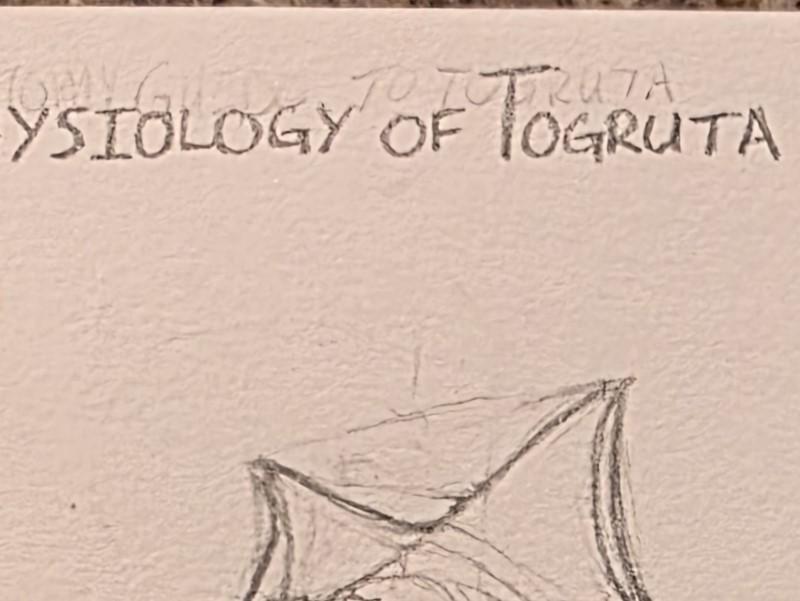
Note the spots on the text "T", the texture of the paper, and the very high contrast between the lines and the paper. This rings of the over processing that YouTube has started to implement on shorts. They come out overcooked and "crunchy".
I decided to try out some different modes in my camera, trying out Pro mode, with unlocks ISO, F-Stop, White balance and more. I set my camera to Pro mode, didn't change anything from their 'auto' settings. The picture below is substantially better than previous.
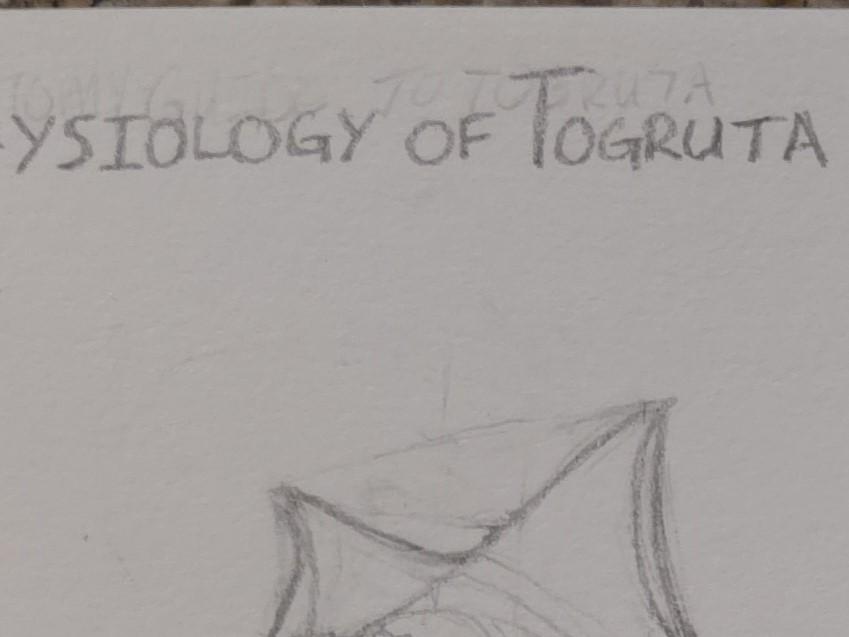
Note the lines look more like pencil marks, instead of ink on the paper. The spotting on the "T" looks more like paper texture than stippling. The texture of the paper is not over-pronounced. Compared, the Pro-mode photo feels blurrier, but it is actually more representative of the real life view.
For casual pictures, I won't have to pull out the flatbed scanner!